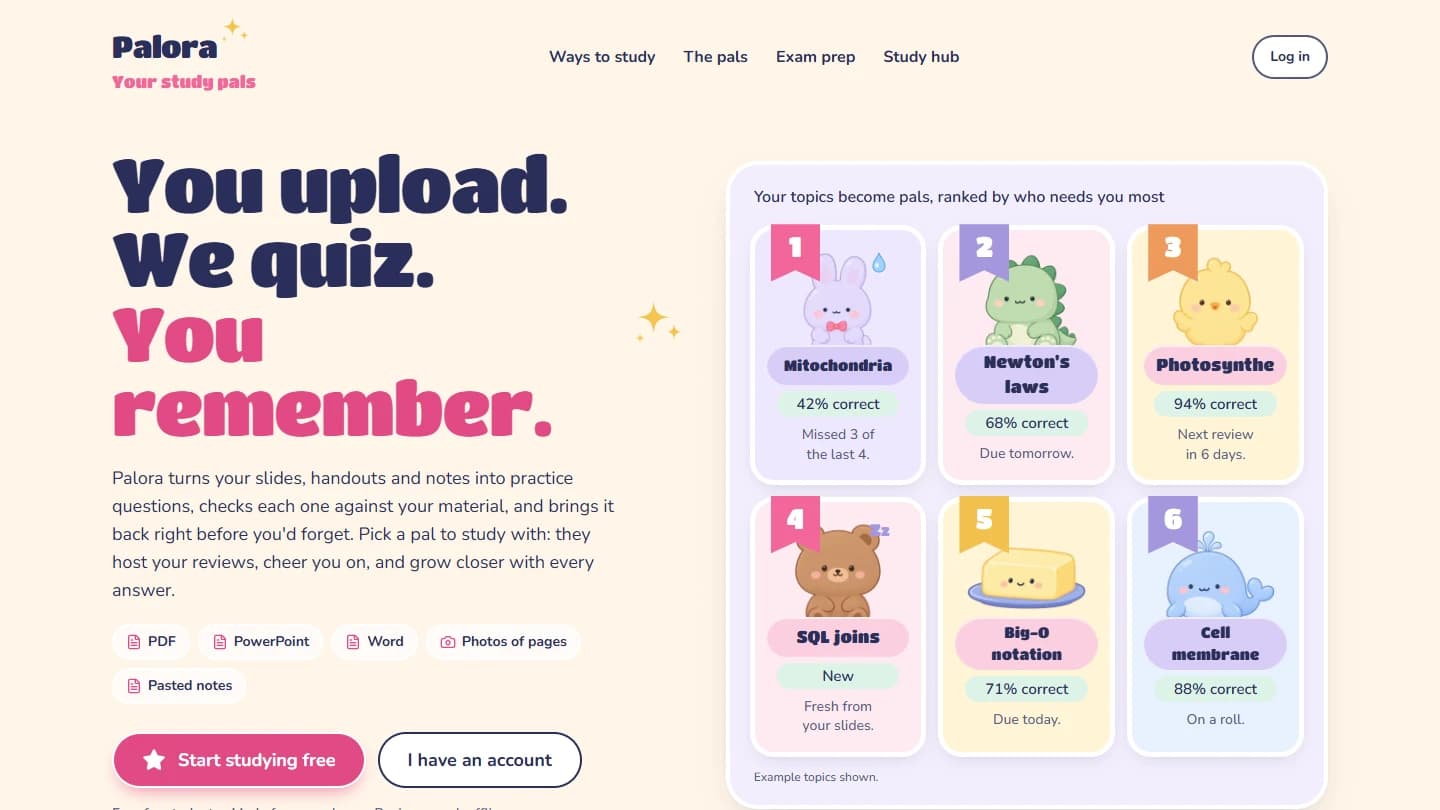
Palora turns a student's own study material into practice questions and a routine for returning to them. I built the application around document ingestion, a separate question-verification pass, and review scheduling, then connected those mechanics to illustrated study pals and a broader study hub.
From study material to practice#
Students can add PDF handouts, PowerPoint slides, Word documents, photographed pages, or pasted notes. The ingestion layer parses each supported format into labeled source units, splits the material into chunks, and keeps the relationship between a question and its source section. Photos and source units that need OCR go through the vision path.
Generation options control question types, difficulty, focus, and requested counts. The supported questions include multiple choice, short answers, fill-in-the-blank prompts, and key terms. Explanations and topic tags accompany the questions so a learner can return to the material behind an answer.
The public landing-page screenshot uses explicitly labeled example topics. Those percentages illustrate the interface; they are not measured learning outcomes.
Architecture and implementation#
Next.js, React, TypeScript, and Tailwind CSS provide the interface. Supabase supplies authentication and file storage, while Prisma accesses the PostgreSQL application records. Zod defines the request and model-output contracts; unpdf and JSZip support document extraction.
I separated ingestion, generation, verification, and review persistence instead of making an upload depend on one uninterrupted model request. The generation worker processes bounded batches, saves its progress cursor, and requests a continuation when its configured time budget is reached. A retry resumes from stored progress and skips chunks that already have questions.
Model routing depends on the task. Question generation leads with Gemini and can fall back to Groq; verification and answer judging lead with Groq and can fall back to Gemini. Vision uses Gemini. Retry and timeout behavior lives in a shared router rather than in individual interface components.
Check questions against the source#
Generated questions enter a second pass that receives the source material, question, answer, and explanation. The verifier returns valid, corrected, or invalid verdicts. Missing or malformed verdicts are rejected. Invalid questions can trigger one regeneration round, followed by another check.
Accepted questions, verification records, and initial review schedules are persisted together. This gives the application a record of why material entered the review queue, rather than treating a successful model response as sufficient by itself.
The companion engineering article walks through the generation cursor, verifier, and review transaction in more detail.
Seven ways to study#
The same library supports several activities:
- Questions: answer a prompt, receive grading and an explanation, and update its review schedule.
- Flashcards: reveal the answer and rate recall as Again, Hard, Good, or Easy.
- Match pairs: connect terms with their meanings.
- Teach your pal: explain a topic in your own words and compare the explanation with the notes.
- Brain dump: recall a section without looking, then inspect what was covered or missed.
- Put in order: reconstruct a sequence drawn from the material.
- Quick read: revisit key points and terms, with an option to listen through browser speech.
Question reviews and self-rated cards feed SM-2 scheduling. The scheduler tracks interval, repetition count, and ease, with due dates calculated at the learner's local day boundary. Other activities have their own recording and reward paths; completing every kind of activity does not automatically reschedule every question.
Pals and the wider study hub#
Students can choose from 30 illustrated pals to look after their notes and host study sessions. Friendship hearts and levels connect study activity to the selected pal. Greetings, care interactions, and due-review indicators make the companions part of the navigation and review routine.
The reminder implementation includes opt-in daily and planned-session Web Push notifications, alongside unfinished-session and streak-at-risk prompts in the interface.
Subjects group related notes, while weak-topic views and note search help locate material that needs attention. The hub also includes a glossary, mistake review, weekly recaps, study history, focus-and-break timers, and Anki text exports.
Practice exams score timed runs locally and summarize missed questions by topic. Calendar plans distribute preparation sessions before an exam using the work remaining in each note. These plans remain separate from the SM-2 review schedule. An exam-readiness label summarizes recorded answers; it is not a prediction of a real exam score.
Offline behavior and validation scope#
Palora is an installable PWA. Its question-review path can use cached material and retain pending attempts on the device, then submit them when a connection returns. Creating new questions and model-based checking still require online services. Offline availability depends on what has already been cached.
This case study is grounded in the current local implementation, its private GitHub repository, and the public product presentation. The question verifier is a model-based quality check, not a guarantee that every answer is correct. No independent learning-effectiveness result or adoption figure is claimed here.
Explore Palora#
Open Palora to see the public study-hub presentation, or read how verified questions become spaced reviews. The application source is private.